If another AI assistant has already built up a picture of you, you can bring that across rather than beginning from nothing. Budget about two minutes.
Where to find it
Where: Settings › Memory
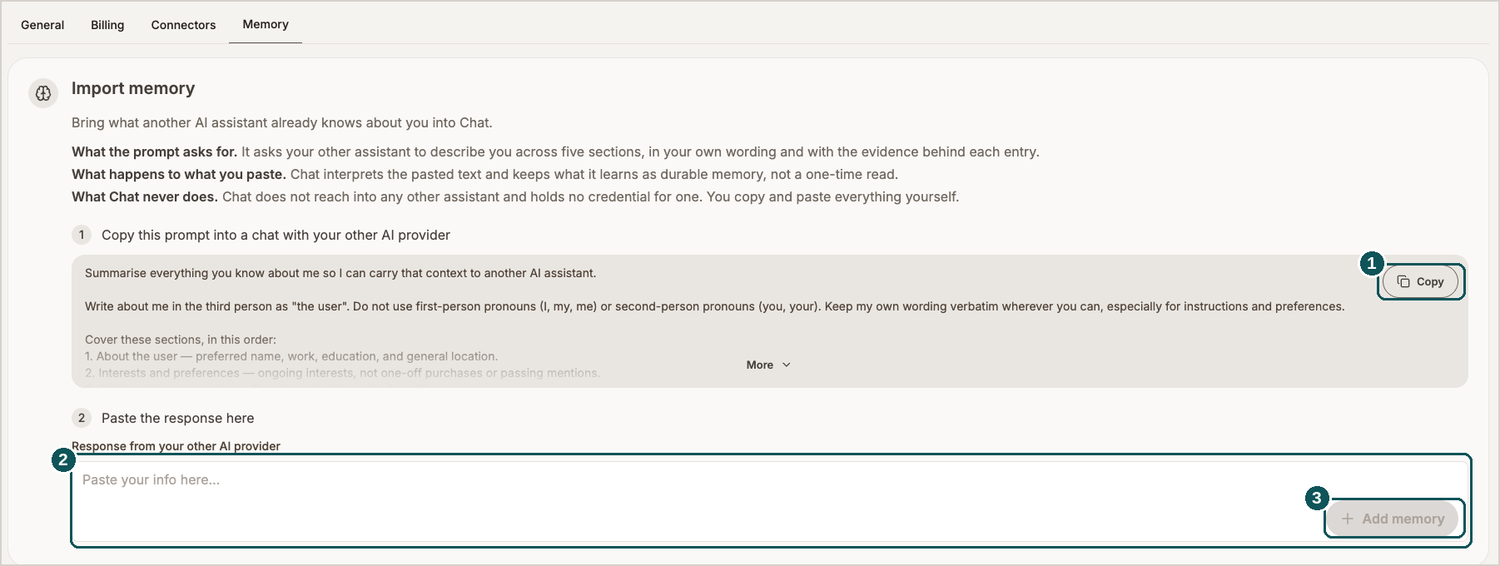
- Copy. Puts the supplied prompt on your clipboard.
- Paste field. Where the other assistant's reply belongs.
- Add memory. Commits what you've pasted.
How to do it
- Hit Copy to take the prompt. There's more to it than first appears — More reveals the remainder.
- Drop it into a chat with your other AI assistant. The prompt asks that assistant to describe you over five sections, opening with who you are and what interests you, holding on to your own phrasing and the evidence sitting behind each entry.
- Copy whatever it hands back.
- Drop that into Response from your other AI provider and press Add memory.
Two things worth knowing
Use the prompt exactly as given rather than rewording it. It has been built to push the other assistant into the third person, retain your preferences word for word, and exclude one-off purchases — and that's what makes the output useful at this end.
Whatever you paste turns into durable memory for Chat, not something glanced at once and then forgotten.
Keeping the transfer manual is a deliberate decision. [Product] never reaches into another assistant and holds no credentials for one; every part of the handover is done by you, copying and pasting.