Connecting Google
Where: Settings › Connectors
- Head to Settings → Connectors and pick Google.
- Work your way through Google's standard permission screens.
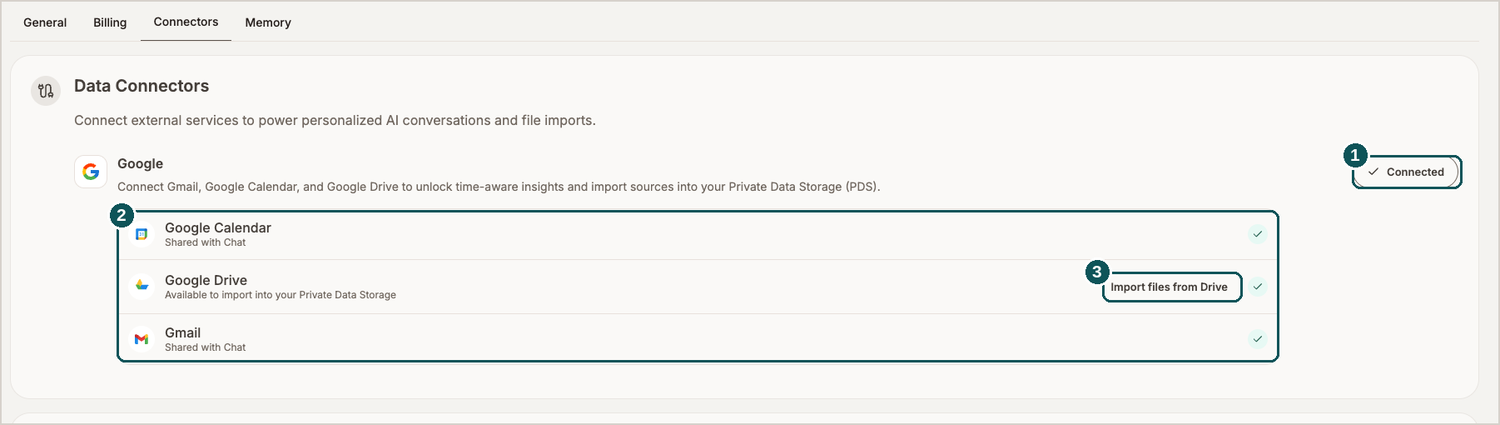
- Connection status. Click through to connect or to manage an existing link.
- What Google covers. Calendar and Gmail supply Chat and the Hub; Drive acts as a source of files.
- Import files from Drive. Brings documents directly into your Private Data Storage.
Data access grants
Where: Settings › Connectors › lower half
Lower down that same tab, every connected account divides into two permissions that operate independently.
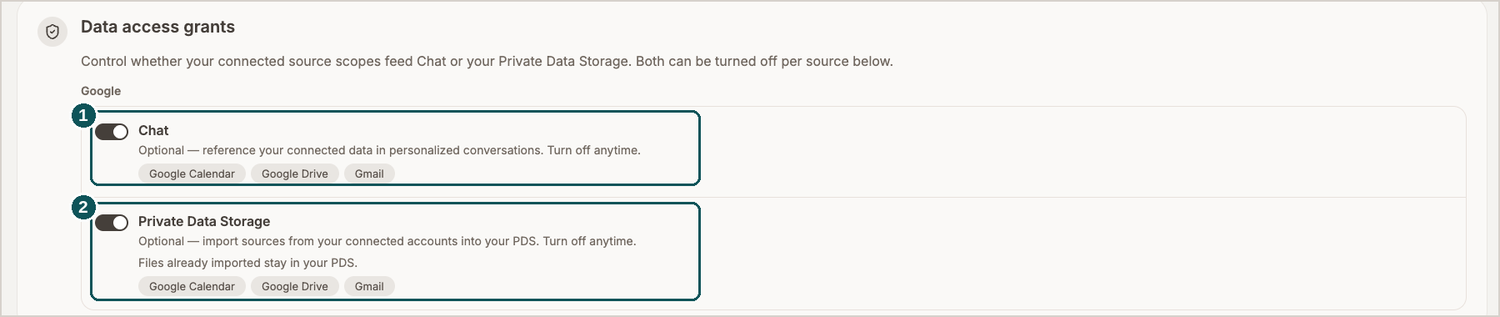
- Chat. Allows your connected data to be referenced during conversation (coming soon, not available on launch).
- Private Data Storage. Allows sources from that account to be imported into your PDS.
Underneath each grant you'll find the scopes it reaches — Google Calendar, Google Drive and Gmail in Google's case — so nothing about a toggle's reach is left to guesswork before you leave it on.
These really are independent of one another: Gmail can feed the Hub while no file is ever imported, or Drive can supply files while your mail stays out of conversations entirely.